Reference, recipes, and runbooks for the Agentia Developer Experience. Search, copy, ship.
⌘K
Using Agentia from Cursor or another coding agent?
Install Agentia Skills in the project so your agent can load the correct work, data, promotion, testing, or AI playbook before it runs a command. Add the local MCP server when you also want native Agentia tools in the IDE. The CLI performs the operation, MCP exposes it as a tool, and the skill tells the agent which operation to choose and in which order. Your agent also needs the Salesforce Skills to work with Salesforce metadata, Apex, SOQL and orgs.
agentia setup is a fully interactive onboarding experience: run it with no options and it walks you through preparing this machine and the current project — CI/CD and Agentia Testing authentication, Cursor MCP, local quality gates, and AGENTS.md. Then set your project defaults for local development and add Agent Skills for your coding agent. Defaults are stored once per project (or machine-wide with --global) so you do not have to pass the same project, environment, credential, team or sprint values on every command. agentia setup does not install the Salesforce Skills; install them separately (see Agent Skills → Salesforce Skills).
Each local quality gate run is stored on the User Story as a Copado Test record, and every Test record needs an Extension Configuration. In the Governance Org, a Copado Admin should create and activate, or confirm that it exists, the Local Quality Gate Extension Configuration with Copado Phase Test, Extension Tool None, and Test Type Unit Test.
Portable, project-local Markdown playbooks that teach compatible coding agents how to operate Agentia CLI and its MCP tools safely: command order, prerequisites, workflow boundaries, examples, and guardrails for Copado CI/CD, Copado Robotic Testing, and Copado AI.
Agentia Skills teach your coding agent how to operate Copado. The Salesforce Skills, published by Salesforce in forcedotcom/sf-skills, teach it how to work with Salesforce itself: metadata, Apex tests and logs, SOQL, data, and org management. Install both so your agent can do the full job.
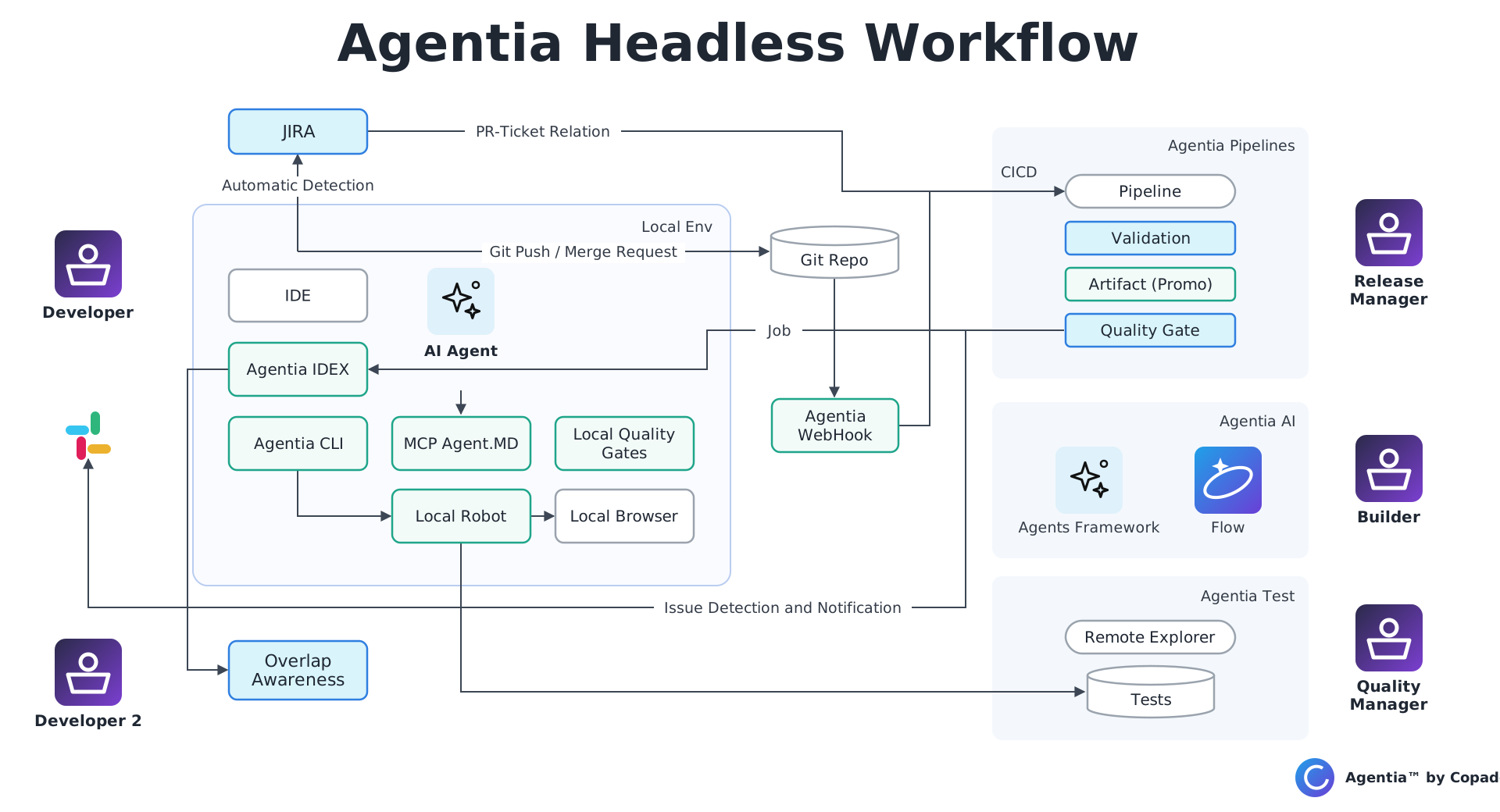
How the IDE, CLI, AI agent and local quality gates connect to Git, Jira and the Agentia Pipelines, AI and Test services.
● CLI reference
Every agentia command
286 commands across CI/CD, Testing, and AI: npm i -g @copado/agentia-cli
Work items, promotions, environments, pipelines, jobs, metadata, data templates, functions, and repositories under `agentia cicd`.
Source Format pipelines only.Commits, jobs, promotions, conflict resolution, deployments, data operations, metadata and dependency commands work with Copado CI/CD Source Format pipelines. Metadata Format pipelines are not supported.
Copado AI · Context Hub
Use Copado AI as your agent model in VS Code
You can get the same agent experience you know from Cursor or Claude Code, directly in VS Code, with Copado AI (Context Hub) as the model. If you are already a Copado customer, your agent runs on Copado AI, so you don't use tokens from those other model providers.
Why combine Copado AI with Agentia™
Copado AI with Org Intelligence™
The model understands your org: fields, objects and schema you actually have, so suggestions fit your metadata.
Agentia™ CLI and IDE
The agent can plan work, commit, run tests and promote changes through Copado using the agentia CLI, MCP tools and skills.
Driven by your agent IDE
The coding agent in VS Code runs the conversation, edits files and calls Agentia™ for you, end to end.
Before you start
Visual Studio Code 1.85.0 or newer.
A Copado AI personal access token (PAT): in the Copado AI web app, go to Profile → PAT key.
Node.js and Git installed if the agent will run project builds or terminal commands.
1. Install the Cline extension
Open Visual Studio Code.
Open the Extensions view (Cmd+Shift+X on macOS, Ctrl+Shift+X on Windows/Linux).
Search for Cline and install the official Cline extension. You can also get it from cline.bot.
Check that the Cline icon appears in the Activity Bar on the left.
2. Connect Cline to Copado AI
Click the Cline icon to open its panel.
Click the Settings (gear) icon in the top right corner of the panel.
Set API Provider to OpenAI Compatible.
Set Base URL to the address for your Copado AI region below (United States is the default), replacing {org_id} and {workspace_id} with your Copado AI organization and workspace IDs.
Paste your Copado AI PAT into the OpenAI Compatible API Key field.
In Model, type build.
Save the settings to test the connection.
# United States (US - Default)
https://copadogpt-api.robotic.copado.com/organizations/{org_id}/workspaces/{workspace_id}/cline/v2
# Europe (EU)
https://copadogpt-api.eu-robotic.copado.com/organizations/{org_id}/workspaces/{workspace_id}/cline/v2
# Australia (AU)
https://copadogpt-api.au-robotic.copado.com/organizations/{org_id}/workspaces/{workspace_id}/cline/v2
# Canada (CA)
https://copadogpt-api.ca-robotic.copado.com/organizations/{org_id}/workspaces/{workspace_id}/cline/v2
# Singapore (SG)
https://copadogpt-api.sg-robotic.copado.com/organizations/{org_id}/workspaces/{workspace_id}/cline/v2
3. Add Agentia™ to your agent
Install the Agentia™ CLI and add Agentia™ Skills so the agent knows how to work with Copado. See the Quickstart in the Agentia™ CLI tab.
Please note: Cline is a third-party extension. Copado is not responsible for the Cline extension, its updates or its behavior. Copado is responsible only for the Copado AI model usage.
Known limitations
Current constraints to review before you plan a delivery. CLI limitations describe what the Agentia interface exposes today. Module limitations describe the behavior of the Copado modules behind it.
Agentia CLI limitations
These limitations describe what the Agentia CLI interface exposes today, grouped by the module it fronts: Copado data templates, records, data commits, and dataset files under `agentia cicd data`, and Copado Robotic Testing (CRT) under `agentia testing`.
Data Deploy
Deployment
Applies to: agentia cicd data
Data must be deployed through a User Story deployment step and the normal submit or promotion workflow. The CLI does not provide data-specific rollback, retry, resume, validation-only, or deployment-status commands.
Data Templates
Applies to: agentia cicd data template
Updating template detail replaces the complete v2 detail document; partial updates are not supported. The CLI does not provide a template-detail diff, edit preview, or concurrent-change warning. Legacy templates must be converted before their v2 detail can be read or updated.
Data Sets and files
The data command set does not provide direct Data Set create, get, list, update, or delete operations. Generated dataset files can be listed and read, but not deleted.
Filters and matching formulas
Advanced filters can be listed, created, updated, and deleted, but an individual filter cannot be retrieved directly by UUID with a get command. Record matching formulas can be listed, created, and updated, but not deleted.
Template synchronization
The CLI does not verify that applied sync entries match the entries included in the deployed metadata commit.
Authentication and connectivity
There is no offline mode, local record matching, local schema cache, or local dataset generation.
Copado Robotic Testing (CRT)
CRT authentication is separate and must be ready, not just set
Applies to: agentia auth set --crt / agentia auth get --crt --json
CRT credentials are independent of Copado CI/CD authentication and need a PAK, a CRT domain, and a positive organization ID. A stored credential can still be unusable, so set: true alone is not a readiness signal.
Workaround: Gate automation on `ready: true` from `agentia auth get --crt --json`, and correct anything reported in `missing` or `issues`.
Streaming, watching, and data-driven runs cannot be combined
Applies to: agentia testing build run
--stream-logs and --watch are human-terminal features and are not available with --json. A --datatable run cannot be combined with --wait-for-result, --stream-logs, --save-artifacts, or --xunit.
Workaround: For automation, run with `--json`, then poll `agentia testing build get` and read logs with `agentia testing build logs`.
Build search requires a job and is paged
Applies to: agentia testing build search / build list
Metrics-backed search requires both --project and --job, and build list --count also requires --job. Results are paged rather than returned as one complete history.
Workaround: Iterate with `--page` and `--page-size`, and narrow with `--from`, `--to`, `--status`, and `--run-type`.
Local file writes are always explicit
Applies to: agentia testing build logs / job download / data-table export / live
Artifacts, xUnit files, logs, DOM captures, screenshots, reports, and data-table exports are never written implicitly. Raw DOM requires both --dom and --output, and overwriting an existing export target requires --yes.
Workaround: Pass explicit `--output`, `--output-dir`, `--save-artifacts`, or `--xunit` paths in scripts.
Some operations are CLI-only
Applies to: agentia testing live view / live recorder / data-table export
The authenticated live view, the long-running recorder, and data-table export are not available through MCP, and the recorder does not support --json. Live MCP tools also never accept caller-selected local paths.
Workaround: Run these steps from a terminal; use MCP tools for the scriptable parts of the workflow.
Destructive operations always need confirmation
Applies to: agentia testing … delete / abort / live stop / data-table create|update
Non-interactive destructive and protected operations fail without --yes; the MCP equivalents require confirm: true instead. Data-table imports are additionally bounded by file, byte, row, column, and cell limits.
Workaround: Add `--yes` in CI, or `confirm: true` in MCP arguments, and split oversized data files before import.
Project permissions are project-scoped only
Applies to: agentia testing project permission
Permission commands manage view/edit access on a single project and accept exactly one of --user or --group. They are not tenant-administration commands.
Copado CI/CD
Local and cloud development flows cannot be mixed
Applies to: agentia cicd work set / commit / push / submit
The local development flow is not compatible with cloud-side operations such as agentia cicd cloud commit or agentia cicd cloud promote. Pick one flow per User Story.
Workaround: Keep a User Story entirely in the local flow, or entirely in the cloud flow.
Local development requires a fully configured User Story
Applies to: agentia cicd work set
The Work Item/User Story must have a Credential and a Project tied to Pipelines and Environments, so the CLI can resolve the Pipeline and the stage the story is in when development starts.
Profiles and Permission Sets
Applies to: agentia cicd work commit / submit / done
Profiles can be very large and may cause issues during retrieval or commit if they reference metadata that is not present in the target org.
Reports and Dashboards
Applies to: agentia cicd work commit / submit / done
Reports and dashboards can be committed, but folder structure dependencies can sometimes cause dependency issues.
Experience Cloud (Community) metadata
Applies to: agentia cicd work commit / submit / done
Partially supported; some components may not retrieve cleanly.
Salesforce Industries / Omnistudio / Vlocity not supported
Applies to: agentia cicd work set / commit / push / submit
Local development does not support Salesforce Industries, Omnistudio, or Vlocity metadata.
Pushing with git instead of the CLI
Applies to: agentia cicd work push
If a git push is run instead of agentia cicd work push, everything will work as expected, but an empty commit might be generated in order for Copado to function.
Only the tip commit is registered
Applies to: agentia cicd work push
Copado only registers the last commit (the tip commit) on each agentia cicd work push, not every commit done. This is expected, and git only needs the last commit, the tip commit, of a branch.
Find and Replace adds an extra commit
If Global Find and Replace Rules or Environmental Variable Replacement is performed, a new commit will be added on top of the previous commits. This is slightly different from Copado Cloud, where every change and replacement is applied along a single commit, but in git the commit history should not be changed, so an additional commit is required.
Module and platform limitations
These are limits of the underlying Copado modules, not of the CLI.