
'%3e%3cpath%20fill='%230065A9'%20d='M123.471%2013.82%2097.097%201.12A7.973%207.973%200%200%200%2088%202.668L1.662%2081.387a5.333%205.333%200%200%200%20.006%207.887l7.052%206.411a5.333%205.333%200%200%200%206.811.303l103.971-78.875c3.488-2.646%208.498-.158%208.498%204.22v-.306a8.001%208.001%200%200%200-4.529-7.208Z'/%3e%3cg%20filter='url(%23b)'%3e%3cpath%20fill='%23007ACC'%20d='m123.471%20114.181-26.374%2012.698A7.973%207.973%200%200%201%2088%20125.333L1.662%2046.613a5.333%205.333%200%200%201%20.006-7.887l7.052-6.411a5.333%205.333%200%200%201%206.811-.303l103.971%2078.874c3.488%202.647%208.498.159%208.498-4.219v.306a8.001%208.001%200%200%201-4.529%207.208Z'/%3e%3c/g%3e%3cg%20filter='url(%23c)'%3e%3cpath%20fill='%231F9CF0'%20d='M97.098%20126.882A7.977%207.977%200%200%201%2088%20125.333c2.952%202.952%208%20.861%208-3.314V5.98c0-4.175-5.048-6.266-8-3.313a7.977%207.977%200%200%201%209.098-1.549L123.467%2013.8A8%208%200%200%201%20128%2021.01v85.982a8%208%200%200%201-4.533%207.21l-26.369%2012.681Z'/%3e%3c/g%3e%3cpath%20fill='url(%23d)'%20fill-rule='evenodd'%20d='M90.69%20127.126a7.968%207.968%200%200%200%206.349-.244l26.353-12.681a8%208%200%200%200%204.53-7.21V21.009a8%208%200%200%200-4.53-7.21L97.039%201.12a7.97%207.97%200%200%200-9.093%201.548l-50.45%2046.026-21.974-16.68a5.328%205.328%200%200%200-6.807.302l-7.048%206.411a5.336%205.336%200%200%200-.006%207.888L20.718%2064%201.662%2081.386a5.335%205.335%200%200%200%20.006%207.888l7.048%206.411a5.328%205.328%200%200%200%206.807.303l21.975-16.681%2050.45%2046.026a7.959%207.959%200%200%200%202.742%201.793Zm5.252-92.184L57.662%2064l38.28%2029.057V34.943Z'%20clip-rule='evenodd'%20opacity='0.25'%20style='mix-blend-mode:overlay'/%3e%3c/g%3e%3cdefs%3e%3cfilter%20id='b'%20width='144.744'%20height='113.408'%20x='-8.41115'%20y='22.5944'%20color-interpolation-filters='sRGB'%20filterUnits='userSpaceOnUse'%3e%3cfeFlood%20flood-opacity='0'%20result='BackgroundImageFix'/%3e%3cfeColorMatrix%20in='SourceAlpha'%20result='hardAlpha'%20values='0%200%200%200%200%200%200%200%200%200%200%200%200%200%200%200%200%200%20127%200'/%3e%3cfeOffset/%3e%3cfeGaussianBlur%20stdDeviation='4.16667'/%3e%3cfeColorMatrix%20values='0%200%200%200%200%200%200%200%200%200%200%200%200%200%200%200%200%200%200.25%200'/%3e%3cfeBlend%20in2='BackgroundImageFix'%20mode='overlay'%20result='effect1_dropShadow_1_36'/%3e%3cfeBlend%20in='SourceGraphic'%20in2='effect1_dropShadow_1_36'%20result='shape'/%3e%3c/filter%3e%3cfilter%20id='c'%20width='56.6667'%20height='144.007'%20x='79.6667'%20y='-8.0035'%20color-interpolation-filters='sRGB'%20filterUnits='userSpaceOnUse'%3e%3cfeFlood%20flood-opacity='0'%20result='BackgroundImageFix'/%3e%3cfeColorMatrix%20in='SourceAlpha'%20result='hardAlpha'%20values='0%200%200%200%200%200%200%200%200%200%200%200%200%200%200%200%200%200%20127%200'/%3e%3cfeOffset/%3e%3cfeGaussianBlur%20stdDeviation='4.16667'/%3e%3cfeColorMatrix%20values='0%200%200%200%200%200%200%200%200%200%200%200%200%200%200%200%200%200%200.25%200'/%3e%3cfeBlend%20in2='BackgroundImageFix'%20mode='overlay'%20result='effect1_dropShadow_1_36'/%3e%3cfeBlend%20in='SourceGraphic'%20in2='effect1_dropShadow_1_36'%20result='shape'/%3e%3c/filter%3e%3clinearGradient%20id='d'%20x1='63.9222'%20x2='63.9222'%20y1='0.329902'%20y2='127.67'%20gradientUnits='userSpaceOnUse'%3e%3cstop%20stop-color='%23fff'/%3e%3cstop%20offset='1'%20stop-color='%23fff'%20stop-opacity='0'/%3e%3c/linearGradient%3e%3c/defs%3e%3c/svg%3e)


Agent · 01
Plan
Turn a Jira ticket into a sprint-ready user story.
Drafts acceptance criteria, story points, and pipeline routing from one line of intent.
$ agentia cicd work create --title "My story"
Commit, promote and deploy from Cursor, VS Code or your own agent. Agentia Headless puts Copado DevOps, testing and AI behind one CLI, enforces quality gates locally and keeps Copado as the system of record.
Agentia Headless is available to Agentia Pro, Agentia Advanced, Agentia Testing, Copado CI/CD and Copado Robotic Testing customers. New to Agentia? Start a free Agentia trial.
Early access to Agentia Headless gave us a clear picture of where enterprise Salesforce development is heading. The governance stays intact for the release manager, but the developer experience is finally catching up to how modern engineering teams actually work.

Salesforce developers are already moving faster with AI coding tools like Cursor, VS Code, and their own agents, until they have to stop and switch to a UI to commit, promote, and deploy. Agentia removes that stop without removing governance: every Copado capability, Headless, with Copado still the system of record.
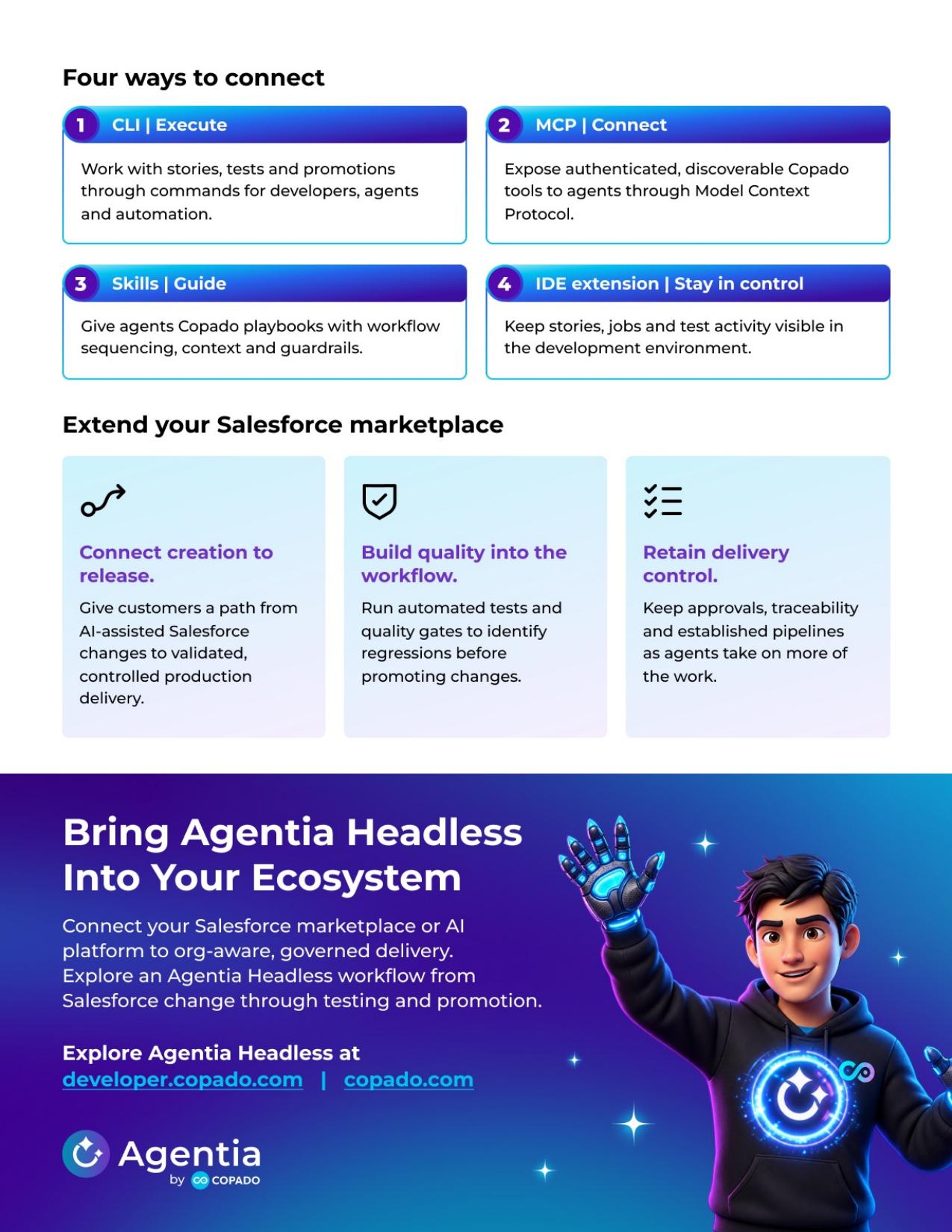
Agentia Headless unifies Copado's DevOps, Testing and AI tooling behind a single CLI so every operation is reachable from an agentic IDE, no UI-heavy console hops between products.
Agentia remains the system of record. Pipelines, logs, promotions, and quality gate configuration live exactly where they do today, you just drive them from your editor.
Gates run in the developer's local environment before anything moves, so speed never costs the release manager visibility, traceability, or control, even at 20 to 50+ developers.
A local MCP server exposes every agentia command to Cursor, Copilot, or your own agent, nothing to host, no remote hop. Standardised on agents.md so any tool can read the rules.
Extend pipelines with SonarQube, Snyk, or in-house checks, and add local commands and plugins. VS Code extension first, that's where the Salesforce community already lives.
Datasheet
Agentia Headless connects AI-powered Salesforce development to governed delivery, grounding agents in real org context while extending Copado testing, pipelines and release controls into the tools developers already use.
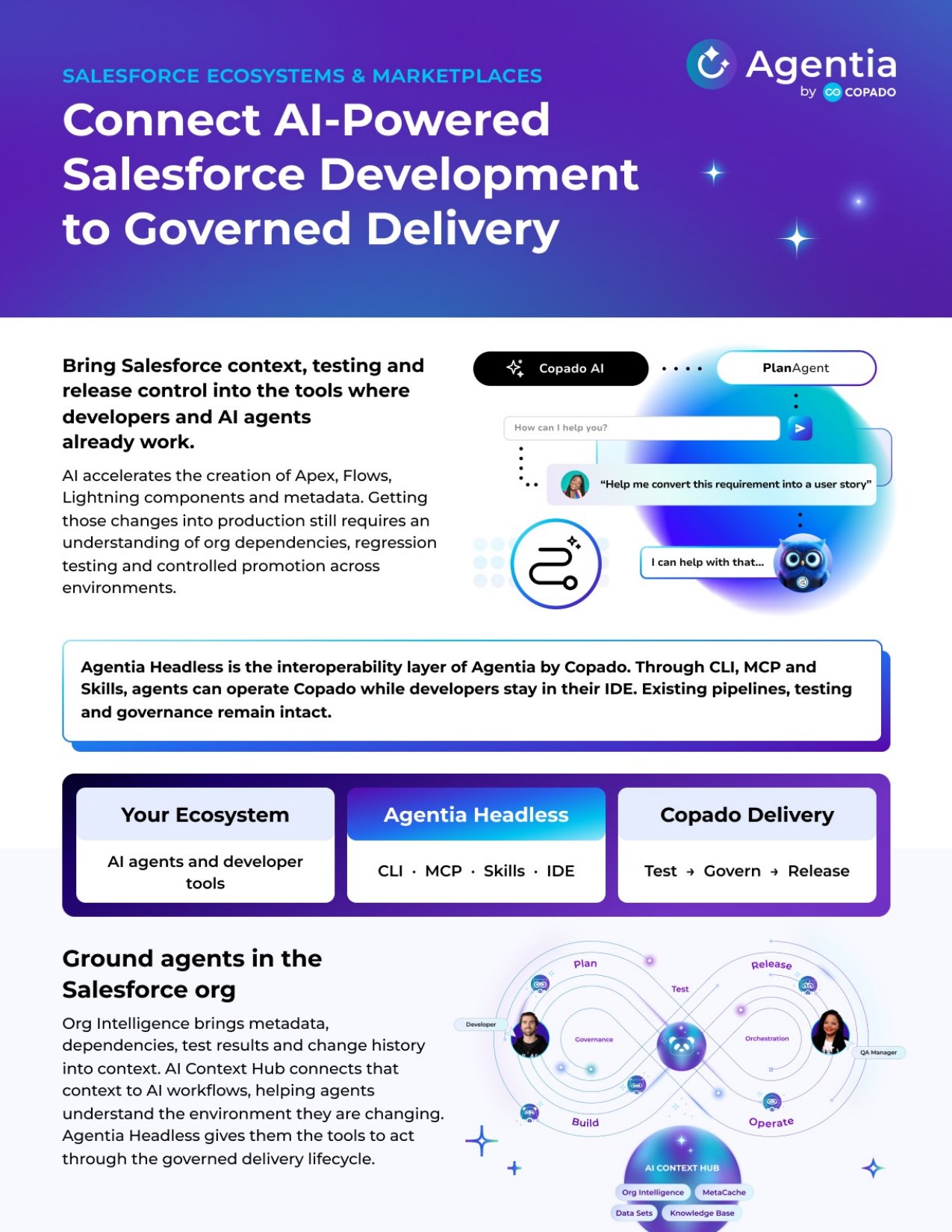
Five agents · one lifecycle
Each agent is purpose-built for one stage of the Salesforce lifecycle. They share context, learn from your mistakes, and never deploy anything Copado doesn't know about.
Turn a Jira ticket into a sprint-ready user story.
Drafts acceptance criteria, story points, and pipeline routing from one line of intent.
Org-aware code that fits your metadata.
With Org Intelligence™, your suggestions are always grounded in the fields and schema you actually have.
Generate the Apex tests you'd write at 5pm.
Auto-generates coverage for triggers, flows, and LWCs, and rewrites them when the org changes.
Quality-gated promotions, never manual merges.
Runs PMD, SOQL, security, and compliance gates before any promotion to UAT or Production.
Watch production, learn from incidents.
Surfaces drift, failed flows, and slow queries and feeds the fix back to the Build agent.
When Operate finds a flow that failed in prod, Build won't suggest the same pattern tomorrow. Agents learn together.
For Copado customers
Agentia Headless is available for all Copado solutions. Install the Agentia CLI, connect it to your Copado account once, and run your pipeline from any IDE.
New to Copado? Headless needs a Copado account. Start a free Agentia trial, then come back and install the CLI.
npm install -g @copado/agentia-cliMakes the agentia binary available system-wide.
agentia setupThe wizard guides you through authentication, skills configuration, local quality gates and more.
Companion IDE extensions are available for VS Code and, via Open VSX, for Cursor.
Copado AI as your agent model
Already a Copado customer? Use Copado AI (Context Hub) as the model behind your coding agent in VS Code, without spending tokens from other model providers.
See how to set it upUse cases · 60-second demos
Learn how Agentia removes obstacles from release day, from dependency analysis to RCA staging to story transitions.
Stay in sync with your pipeline — CLI + IDE
Read the docs →ONE PLATFORM · THREE ROLES
See what’s possible when DevOps is built to be extended. Explore how developers are using Agentia Headless to build custom tools, automate workflows, and bring Agentia capabilities into the environments where their teams already work.
Read More